K-fold Cross Validation

I had some confusions in my AI class regarding how k-fold cross validation worked, and I found this very concise and clear explanation for it:


How to rename an iOS project in XCode

Renaming a project in XCode can be a hassle and cause a lot of complications and problems if not done correctly because there are a lot of root files and embedded files that must be renamed as well. So how can you easily rename a project in XCode?

The following tutorial shows you how to do it within 3 minutes and I found it very helpful:  https://www.youtube.com/watch?v=6P6ya2vdC8M&ab_channel=CodeDisciple

The only discrepancy I found in that tutorial (made in 2019) and Xcode version today (2021) is that I don’t believe the current version has an option to rename the “Development Assets” under Deployment, but everything else is the same.

Best of luck!

Constraint Satisfaction Problems (CSP)

Constraint Satisfaction Problem

Characteristics:

    • Search problem
    • Care about the goal itself: state is a black blox, implemented as some data structure
    • Goal test: function over the states, set of constraints specifying allowable combinations of values for subset of variables
    • Main 3 elements of CSP:
  1. Set of variables
  2. Set of domains for each variable
  3. Set of constraints

Customize your vim: How to add line numbers, colors, and cursor to your vim

Vim can be very annoying to navigate and use when everything is one color, there are no line numbers to help debug, and you must only use arrow keys to navigate. Here is how to customize your vim for easier convenience when programming:

Go to terminal, type command:

vi ~./vimrc

The vimrc file contains optional runtime configuration settings to initialize Vim when it starts. You can customize Vim by putting suitable commands in your vimrc.

In this file, type the following

To turn on color schema: 

syntax on 

colorscheme delek

To add line number:

set number

To add cursor:

set mouse=a


Intro to Swift iOS Programming

For my research at school, we are building an iOS application to help the visually impaired navigate through new environments. To do so, we had to go through a few Swift tutorials. Here are some that were provided that I found helpful:

https://docs.swift.org/swift-book/GuidedTour/GuidedTour.html

Start Developing iOS (Swift):

https://developer.apple.com/library/archive/referencelibrary/GettingStarted/DevelopiOSAppsSwift/index.html#//apple_ref/doc/uid/TP40015214-CH2-SW1

This one is a little outdated, but it still serves to introduce the main concepts and functions.

iOS Glossary:

https://developer.apple.com/library/archive/referencelibrary/GettingStarted/DevelopiOSAppsSwift/GlossaryDefinitions.html#//apple_ref/doc/uid/TP40015214-CH12-SW1

Some unique sorting functions in Python

Here are some unique ways to sort in python

Sort list in Descending order

# vowels list
vowels = ['e', 'a', 'u', 'o', 'i']

# sort the vowels
vowels.sort(reverse=True)

# print vowels
print('Sorted list (in Descending):', vowels)

Output

Sorted list (in Descending): ['u', 'o', 'i', 'e', 'a']

Sorting using custom key

# sorting using custom key
employees = [
    {'Name': 'Alan Turing', 'age': 25, 'salary': 10000},
    {'Name': 'Sharon Lin', 'age': 30, 'salary': 8000},
    {'Name': 'John Hopkins', 'age': 18, 'salary': 1000},
    {'Name': 'Mikhail Tal', 'age': 40, 'salary': 15000},
]

# custom functions to get employee info
def get_name(employee):
    return employee.get('Name')


def get_age(employee):
    return employee.get('age')


def get_salary(employee):
    return employee.get('salary')


# sort by name (Ascending order)
employees.sort(key=get_name)
print(employees, end='\n\n')

# sort by Age (Ascending order)
employees.sort(key=get_age)
print(employees, end='\n\n')

# sort by salary (Descending order)
employees.sort(key=get_salary, reverse=True)
print(employees, end='\n\n')

Output

[{'Name': 'Alan Turing', 'age': 25, 'salary': 10000}, {'Name': 'John Hopkins', 'age': 18, 'salary': 1000}, {'Name': 'Mikhail Tal', 'age': 40, 'salary': 15000}, {'Name': 'Sharon Lin', 'age': 30, 'salary': 8000}]

[{'Name': 'John Hopkins', 'age': 18, 'salary': 1000}, {'Name': 'Alan Turing', 'age': 25, 'salary': 10000}, {'Name': 'Sharon Lin', 'age': 30, 'salary': 8000}, {'Name': 'Mikhail Tal', 'age': 40, 'salary': 15000}]

[{'Name': 'Mikhail Tal', 'age': 40, 'salary': 15000}, {'Name': 'Alan Turing', 'age': 25, 'salary': 10000}, {'Name': 'Sharon Lin', 'age': 30, 'salary': 8000}, {'Name': 'John Hopkins', 'age': 18, 'salary': 1000}]

Soft using custom key with lambda

# sorting using custom key
employees = [
    {'Name': 'Alan Turing', 'age': 25, 'salary': 10000},
    {'Name': 'Sharon Lin', 'age': 30, 'salary': 8000},
    {'Name': 'John Hopkins', 'age': 18, 'salary': 1000},
    {'Name': 'Mikhail Tal', 'age': 40, 'salary': 15000},
]

# sort by name (Ascending order)
employees.sort(key=lambda x: x.get('Name'))
print(employees, end='\n\n')

# sort by Age (Ascending order)
employees.sort(key=lambda x: x.get('age'))
print(employees, end='\n\n')

# sort by salary (Descending order)
employees.sort(key=lambda x: x.get('salary'), reverse=True)
print(employees, end='\n\n')

Output

[{'Name': 'Alan Turing', 'age': 25, 'salary': 10000}, {'Name': 'John Hopkins', 'age': 18, 'salary': 1000}, {'Name': 'Mikhail Tal', 'age': 40, 'salary': 15000}, {'Name': 'Sharon Lin', 'age': 30, 'salary': 8000}]

[{'Name': 'John Hopkins', 'age': 18, 'salary': 1000}, {'Name': 'Alan Turing', 'age': 25, 'salary': 10000}, {'Name': 'Sharon Lin', 'age': 30, 'salary': 8000}, {'Name': 'Mikhail Tal', 'age': 40, 'salary': 15000}]

[{'Name': 'Mikhail Tal', 'age': 40, 'salary': 15000}, {'Name': 'Alan Turing', 'age': 25, 'salary': 10000}, {'Name': 'Sharon Lin', 'age': 30, 'salary': 8000}, {'Name': 'John Hopkins', 'age': 18, 'salary': 1000}]

Reference: https://www.programiz.com/python-programming/methods/list/sort

How to Encrypt a PDF document with Preview

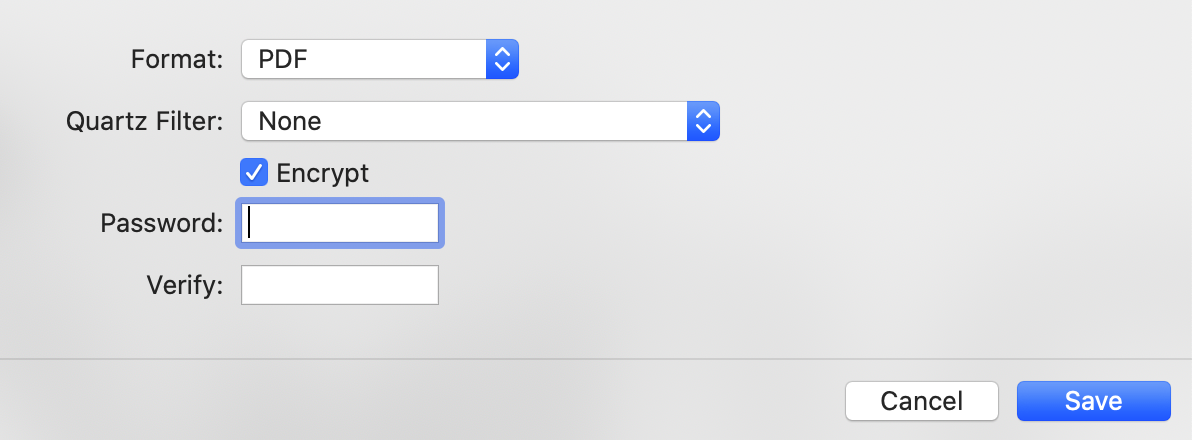
If you have sensitive information in a PDF, you can encrypt the document. To encrypt a PDF document with Preview, open the PDF, and go to File > Export

When you’re exporting it, check the encrypt box, and enter your password:

Now, when you click on the PDF, you will be prompted to enter a password before accessing it:


How to get IP address of visitors (Flask and Python)

Imports:

from flask import request, jsonify

Flask endpoint and code:

@app.route("/get_my_ip", methods=["GET"])
def get_my_ip():
    return jsonify({'ip': request.remote_addr}), 200

request.remote_addr contains the strong of the IPv4 Address

Another way:

from flask import request
request.environ.get('HTTP_X_REAL_IP', request.remote_addr)

Stack overflow post: https://stackoverflow.com/questions/3759981/get-ip-address-of-visitors-using-flask-for-python