More on bash scripting

This was one of my homework assignments for DevTech on Linux:

Write a script that parses the output of /usr/bin/free and checks if the “free” memory is below 400000 (these are kB). If it is, print a warning that the system is running low on memory. Example run: 

./memory_monitor.sh Memory low: 169416 / 400000 

Parsing  /usr/bin/free:

/usr/bin/free:

**Note: free memory is Mem row and the 4th column

You can use grep Mem to get only the row with mem

Afterwards, you can use awk in order to only get the 4th column

Then, you can compare it to 400000. But since it is an integer comparison, we must use the byte comparator which is -lt (yes bash is weird).

**Some other things to note:

-to get the memory, we must surround the execution with $() to store in variable

-when referring back to the variable, we must access with $

-when making if comparisons, there must be a space after and before the [ and ] brackets

-after an if statement is opened, it must be closed with fi

Bash script that I wrote: 

#!/bin/bash

free_mem=$(/usr/bin/free|grep “Mem”|awk ‘{print $4}’)

if [  $free_mem -lt 400000  ]

then

           echo System is running on sufficient memory: $free_mem/400000.

else

           echo System is running on low memory: $free_mem/400000.

fi

To run script:

chmod 744 script.sh

./script.sh

Output: 

Here are my resources on bash syntax for if statements, variables, comparators, etc:

Other Comparison Operators: https://tldp.org/LDP/abs/html/comparison-ops.html

Variables: https://tldp.org/HOWTO/Bash-Prog-Intro-HOWTO-5.html

If Statements: https://ryanstutorials.net/bash-scripting-tutorial/bash-if-statements.php
 

Copying from Virtual Machine onto Local Computer

I’ve been trying to figure out how to copy files from my Virtual Machine environment onto my local computer and desktop. I’m still trying to understand it completely, but according to my DevTech professor, you can use the “scp” command.

This is my professor explaining it (I’ll add commentary once I understand everything):

You can transfer the file to your own computer with secure copy (scp).  It is part of the OpenSSH Suite and is used to transfer files back and forth between machines.  It is like ssh but for file transfer. You will need to include a flag to your local ssh key file.

Here is an online example I found explaining it as well: https://uoa-eresearch.github.io/vmhandbook/doc/copy-file-linux.html

More explanation by my professor: 

From “man scp”, the syntax is:

SYNOPSIS
     scp [-346BCpqrTv] [-c cipher] [-F ssh_config] [-i identity_file]
         [-l limit] [-o ssh_option] [-P port] [-S program] source … target

Square brackets contain options, and they are optional (because they are in square brackets).

The only required option is: scp source target.

You can copy from remote server (VM in this case) to your local computer, or from your local computer to the VM.  This will determine what is “source” and what is “target”.  For example, to copy something from your local computer to the VM (with -i because we need to pass our ssh key because we configured the VM to authenticate this way):

scp    -i /path/to/your/private-key    file-on-local-computer    [email protected]

-i should point to your private ssh key

where username is your VM username, and 12.34.56.78 is your VM external IP address.  To copy in reverse, you reverse the source and target.  If you use scp on the VM then the source/target are relative to the VM.

scp script.sh ~/. will copy the script locally, because “script.sh” is source and “~/.” is target, and this target is local, not remote.  Your VM is remote, it is far away somewhere.  Just like you log into your VM with ssh, scp needs username and IP address to connect to it, this is what defines it as remote.

Another example is uploading your homework to Courseworks.  Courseworks is remote, you can’t access it as you would a local directory on your computer.  You log in, then you upload the file through the web interface.  ssh/scp is just a different interface, in this case for managing (ssh) and moving files (scp) between two different hosts.

Shell scripting basics

I was a little confused on how to write a shell script and we used it for Advanced Programming and also we are doing it in my Linux Projects course so I thought it might be pretty important so I searched it up and found this link that describes it nice and thoroughly: http://linuxcommand.org/lc3_wss0010.php

So first, you can write your script with vim/emacs, nano, etc; Personally I don’t exactly like using nano, I’ve never used emacs because my AP professor was so against it, so I guess I’m most familiar with vim. To write in vim you can just “vi ___” or “vim ___” to create file and save by doing “:wq” or “:q” to just quit without saving. To write in the file you have to press “i” for “insert” to be able to edit it.

Now, onto shell scripting. Shell scripts are essentially a combination of command lines that you would usually do in the terminal, but it does it all for you in one file, which is neat! I believe you can just write 1 command on 1 line (which is what I have been doing so far, maybe fancier shell scripts might be different).

And then, to give the shell permission to execute, you have to chmod it. One chmod could be chmod 755 hello_world (assuming your script was named hello_world) and “755” gives it read, write, and execute permission. To run it, you can do ./hello_world. The reason why this works is because we specified the pathname “./” of the file to execute. I think that “./” just means same directory as you are in.

Now, if you just want to be able to run the hello_world as a command you can put it in your bin. Then, you can just type hello_world in the command line and the code will run.


LitHum Buy Sell Memes

Check out a compilation of memes from spring semester readings in Lithum on my lithum buy sell memes blog: https://lithummemes.blogspot.com/

Linux and Kernels Explained

Some definitions I asked my professor to clarify the general ideas of Linux and kernels in my Development Technologies Linux course:

  1. Linux: Linux is an operating system, like Windows and MacOS.  It runs on hardware – a laptop, desktop or server (or VM).  Shell is an interface to the system.  Just like a Windows or Mac GUI is an interface to those systems.  Mac has a shell interface as well, and you use the terminal application to interface with it in an interactive way.  When you write a script, you interface with it in an automatic way.  Mac also has ls, grep, sudo.  They are system commands or tools, to get things done.
  2. Kernel: Sometimes we talk about Linux being a kernel.  A kernel is a small part of the operating system that runs and managers the hardware.  You don’t see it and don’t necessarily interact with it.  You use commands like ls instead.  In the context where Linux is a kernel, then the system is called GNU/Linux.  This is because the GNU project wrote a lot of the actual operating system, like commands (ls, grep, etc.), compiler, linker, and so on.  You can check it out at gnu.org.

Side notes about organizaing on VM: You can organize your homeworks and assignments in separate directories on your VM, it is good practice to be organized.  It will help you in the future with your projects.

Linear Algebra Concepts

Since I’m studying for my Linear Algebra Midterm 2, I would like to share some cool concepts or algorithms we learned in class. My notes aren’t as neat as they are usually, but here are some cool things:

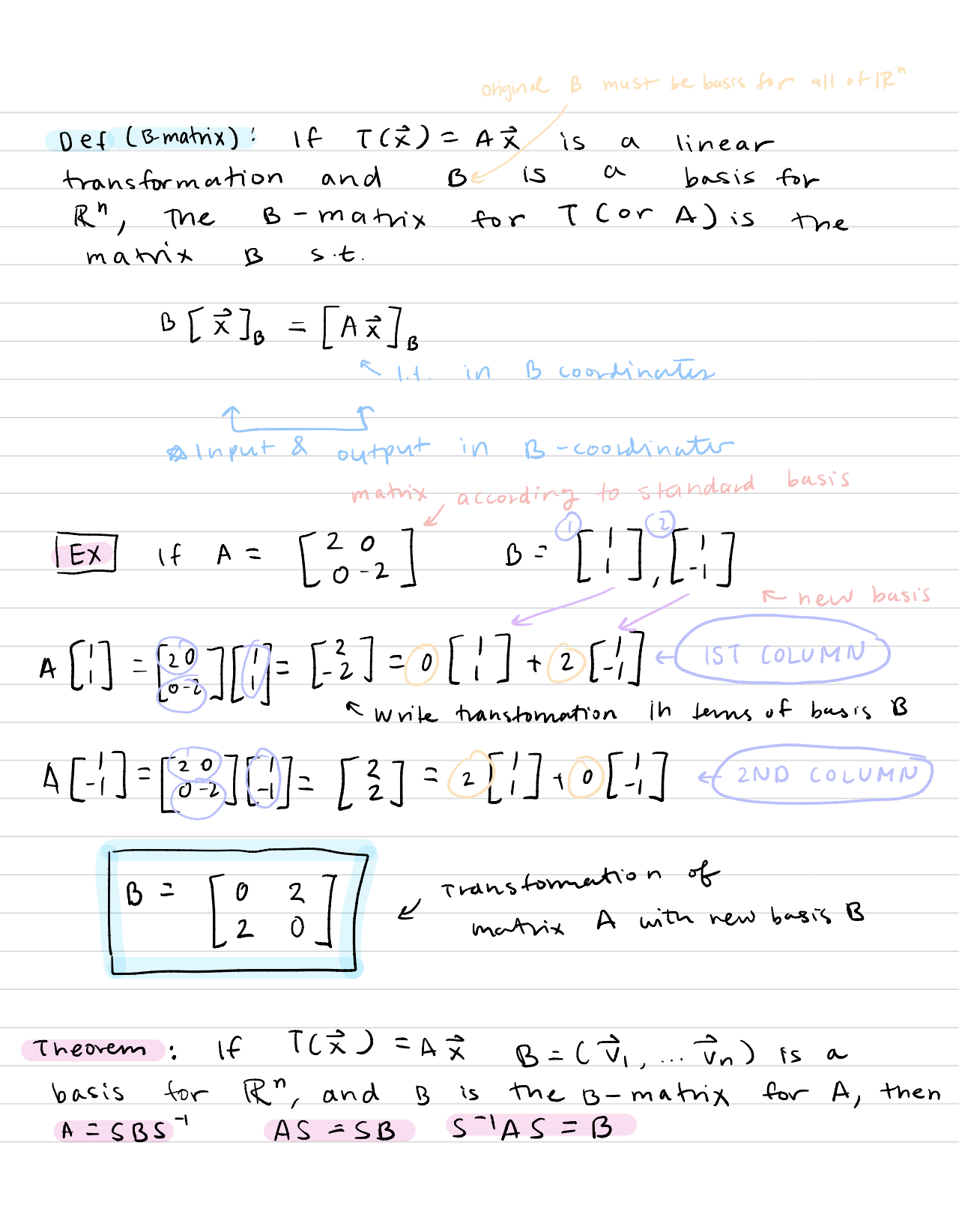
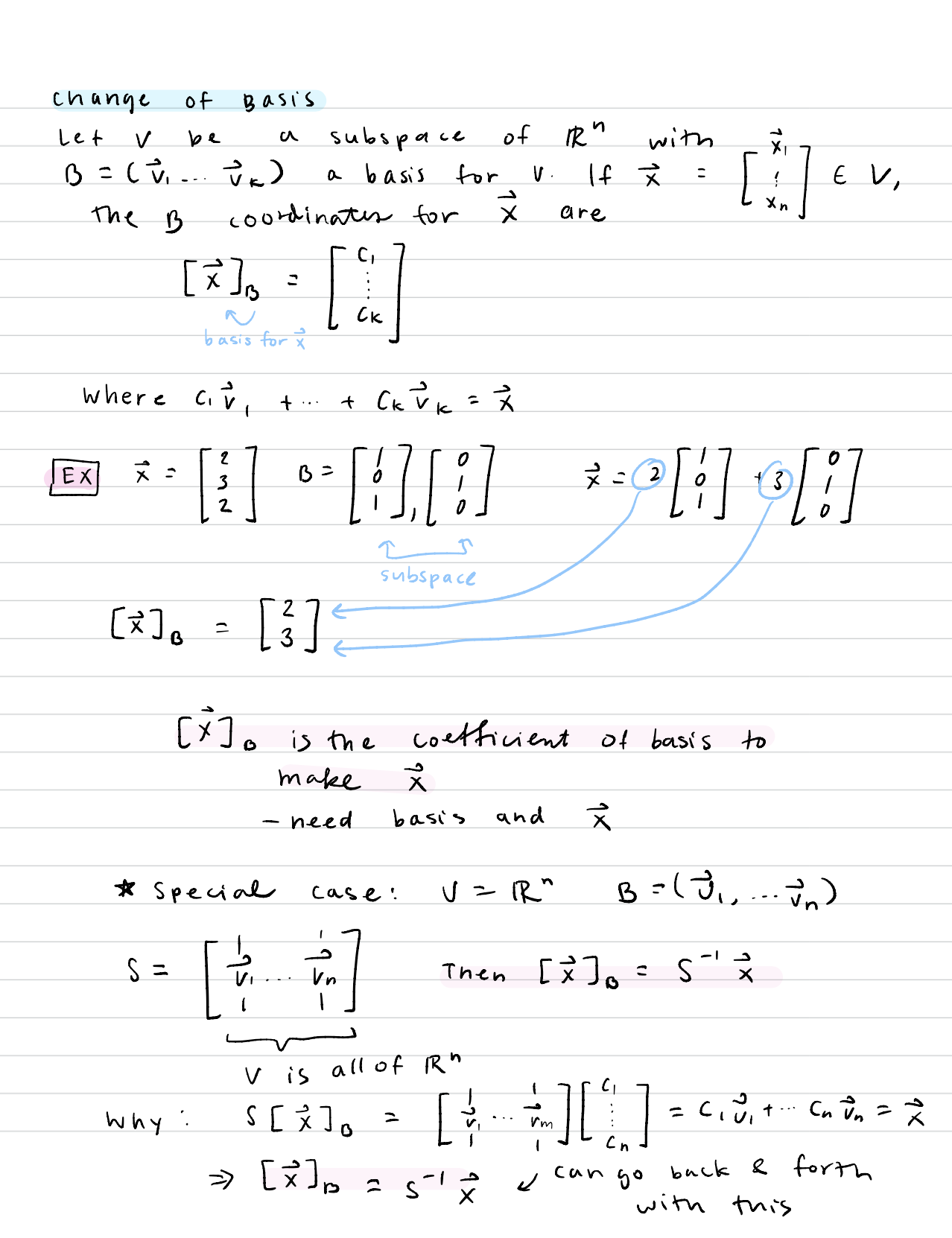
  1. Change of Basis – essentially writing a matrix with  basis for R^n into a matrix with another basis (so converting the matrix into another basis “terms” or “language”)

This is a really great video explanation describing the concept of it: Change of Basis

Here are my notes from it. Here in my notes, [x]B is the new vector in terms of the new basis:

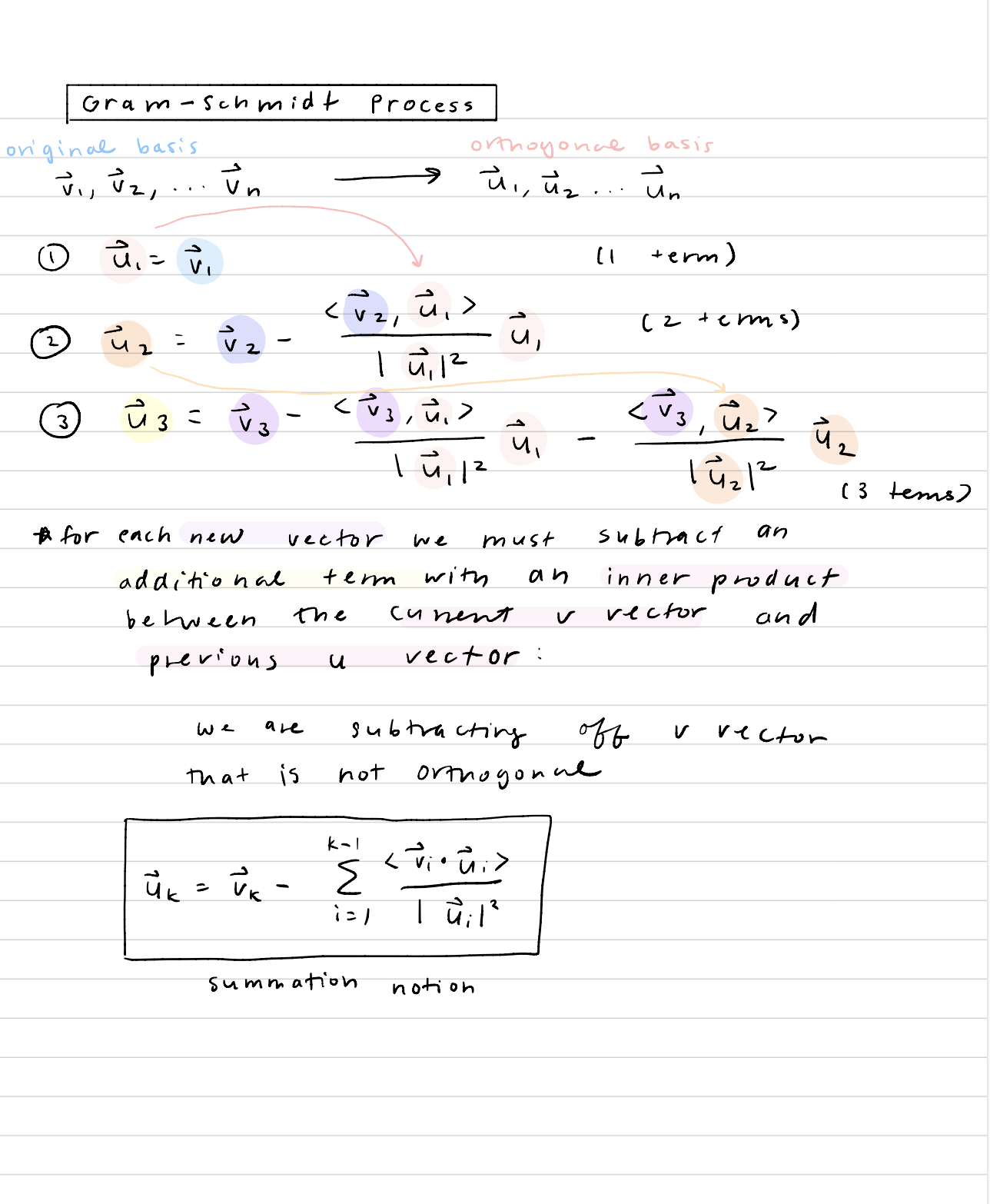
2. Gram-Schmidt Process – a way to solve for the orthogonal and orthonormal basis from an original basis. I thought the algorithm and pattern behind it was interesting since, for each new vector, you essentially subtract the “not orthogonal part” to force the remainder to be orthogonal only

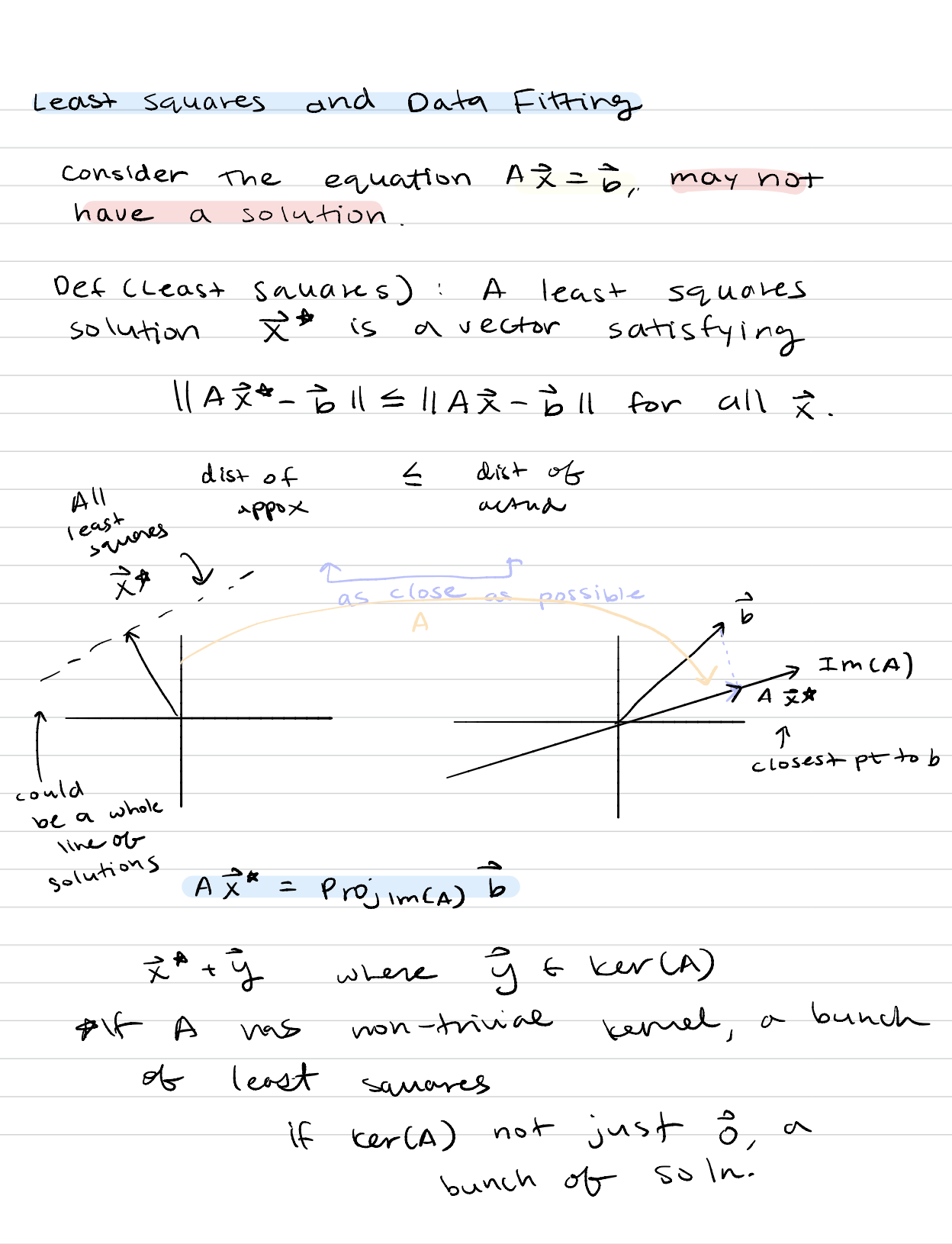
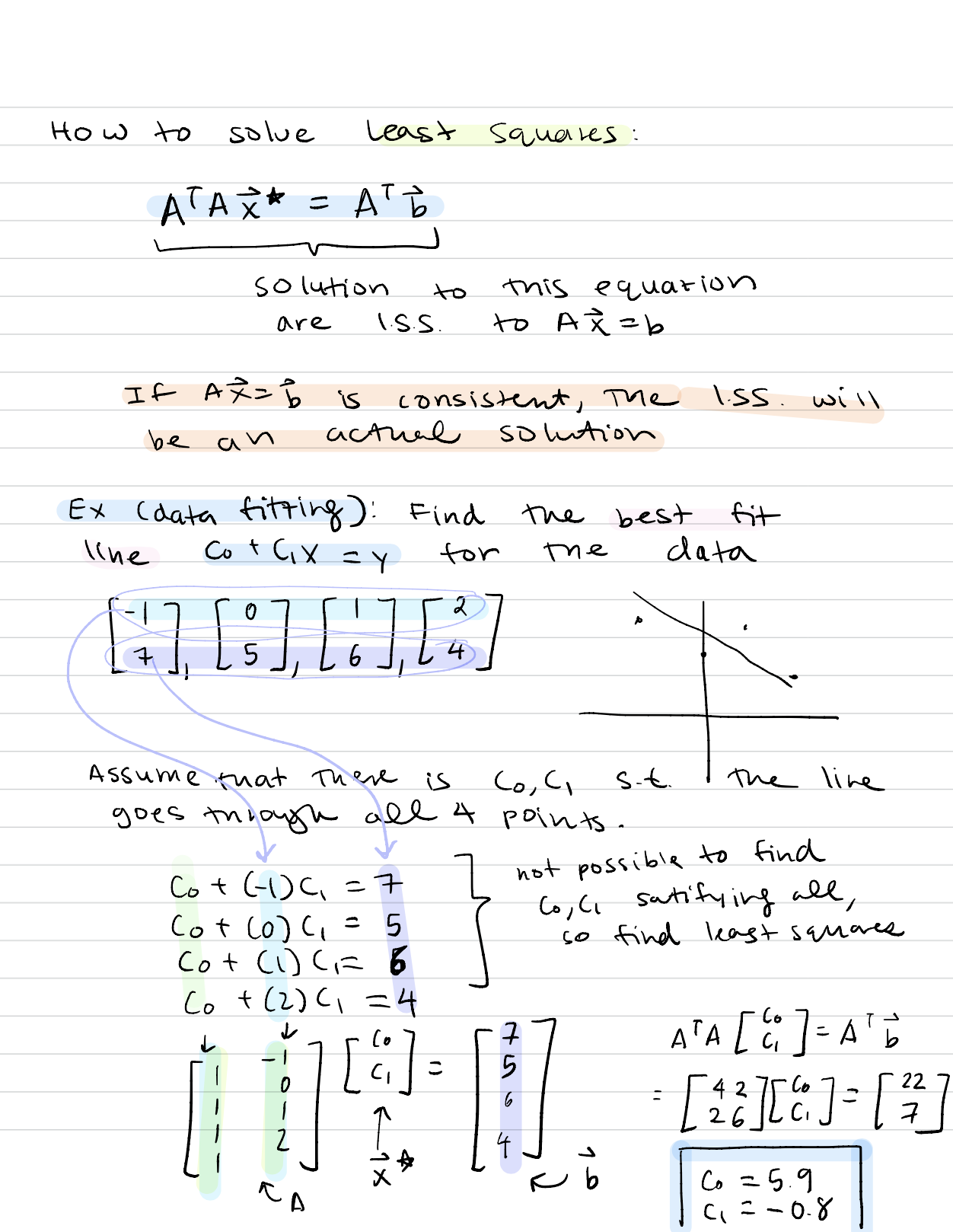
3. Least Squares and Data Fitting – least squares is basically when there is no actual perfect solution to a linear transformation or matrix solution, but you try to find the one that is closest to it. I thought that was pretty deep on both a mathematical and philosophical level because it’s saying that although one cannot reach perfection, they must strive towards it. Sort of like my Model United Nations essay for college applications. If you have a lot of points on a 2D graph, the least squares regression would be the line that best fits the points on a line. I thought this as choosing someone/raising someone too–you can’t get make the perfect person and someone won’t have all the qualities you want, but you can get close enough.

Anyways, here are my notes form it:


COOL THINGS I LEARN AT COLUMBIA AND LIFE

I think I’m going to renovate this blog (for the millionth time) into that title description. I want to have a lot more freedom to post my day-to-day tasks and accomplishments and things I learn. So that will be the new title of the blog, once I figure out how to change the different things with WordPress. Using this website platform is such a pain for web developers, I would much rather program it myself so I can get it the way I like things.

TIL 4.15

Okay so I switched to TIL and the date instead of the number because I don’t want to keep scrolling down to see which TIL I am on since it’s obvious I haven’t been consecutively updating these everyday.

So TIL 4.15: If you don’t ask questions in lecture, there’s no value in going to it


AMII Conference

AMII

Randy:

  • Where does cutting edge AI come from?
    • Carnegie Mellon University
  • Federal AI Strategy Development
  • Ranking of AI and ML: CMU, Tsinghua, University of Alberta, Cornell University, Technion, MIT, UT Austin, JKUST, Berkeley, UMass, UMich, UCLA, Stanford, etc;
    • China AI Strategy has moved Tsinghua from 10thto 2nd
  • AMii focuses on efforts of 4 areas
  • Pan-Canadian AI Strategy
    • $125 million across Canada to attract and retain academic talent
    • Recognizes Canada’s centers of AI excellence: Mila (Montreal), The Vector Institute (Toronto) and Amii (Edmonton)
    • First cohort of Canada CIFAR AI Chairs includes 29 researchers at institutions across Canada
  • Amii has diverse expertise in machine intelligence
    • Algorithmic game theory
    • Algorithms and theory
    • Bio/medical informatics
    • Dana mining & analysis, etc;
  • Machine Intelligence Achievements
    • Pioneer of reinforcement learning
    • First group to beat poker pros at heads-up no-limit texas hold’em
    • Solved game of checkers
    • Academic origins of AlphaGo and the Atari Game Project
    • Developed UCT algorithm at the heart of many advancements in games
    • Thailand National Innovation Award for Tuberculosis Diagnosis
    • System capable of passing Japanese Bar exam
    • Open-source community centered around adaptive prosthetic limbs
  • Amii explores through world-class research and training
    • Amii Explores: pushes the bounds of scientific knowledge by enabling world-class research and training and facilitating knowledge, technology and talent transfer from academia to industry
    • Amii Educates to boost intelligence literacy: courses, workshops & seminars
    • Amii provides a range of meetups, events and educational opportunities to help drive machine intelligence literacy for Alberta workers and businesses—build, reskill, upskill, and retain machine intelligence expertise in Alberta
      • Management level courses
      • Technical level certification
      • Bespoke curriculum development
    • Amii Innovates: guide businesses on path to machine intelligence adoption by helping them develop strategies, shift processes, and systems and build in-house knowledge and teams
  • Connect with amii:
  • Q&A:
    • Will we catch up to China? No
    • China, US, Israel, & Saudi Arabia lead the world on collecting data/information
  • Model-free RL Atari Game Learning
    • Google’s DeepMind Deep Q-learning learns how to play the game after watching the screen
  • Big Data Challenges
    • Square kilometer array
    • DNA transistor
    • Environmental monitoring fluxnet
    • How are you able to determine what to keep / throw away
  • NCAA Football Clusters
    • Challenge: figure out division in NCAA
    • Run a clustering algorithm on the schedule
    • Model visualization changes based on what information you are trying to extract
  • Diagnosing ADHD
    • Machine learning classifier uses a participant’s resting state fMRI scan to diagnose the individual into one of 3 categories: healthy control, ADHD combined type, ADHD inattentive type
    • Used participant’s personal characteristic data: collection age, gender, handedness, performance IQ, verbal IQ, and full scare IQ, FMRI data
  • Image-based glioma biopsy
    • Compute S-transform frequency spectrum for each pixel, the average over all directions to get 1D spectra for each tumor
    • Build multi-frequency classifier based on these labeled cases
    • In these measurement results, BLUE 30 co-deleted 1p/19q, GREEN 24 intact 1p/19q
    • Results: 95-96%
  • Optimizing water treatment control
  • Use machine learning to find separators in the data
  • Natural language & approximate semantics: use the amount of google searchers also in google translate
  • COLIEE Statute Law Challenge
    • Statute: if a person in order to allow a principal to escape imminent danger to the principal’s person, reputation or property, the Manager shall not be liable to compensate for damages…
    • Question: in cases where an individual rescues another person from getting hit by a car by…
  • Query case àcase law judgements àhow to pick the ones to be noticed and the lawyer will notice in the count
  • Why we need explanatory AI systems
  • Funny car cartoon on automation: “Does your car have any idea why my car pulled it over?”
  • MYCIN expert knowledge
  • Rich Sutton, weak versus strong methods
    • Methods that scale with computation are the future of AI
  • Learning a model to classify images
    • classifier to distinguish dogs and cats
  • Experiments
    • Word deletion experiments
    • Green words = positive
    • Building a model of language to explain
  • Summary
    • World leading research group
    • Highlights of game playing, reinforcement learning, NLP, XAI
    • Expanding capacity, building industrial collaboration function
    • Industrial projects with DeepMind, DeepMind Health, Google Brain, Mitsubishi, Borealis AI, Alberta Treasury Branch, VW Group
    • Eager to build sustainable industrial relationships to continually refresh “line of sight” to potential high impact applications
  • Q & A:
    • Generating automatic models instead of analytically building them
    • If you get 2 different explanations and they are contradictions, then what is the model you have to create to compromise the two


Edmonton’sArtificial Intelligence Ecosystem: Research & Business:

  • Path of how businesses are created revolving AI in Edmonton
  • AI is a transformative technology
  • AMII:
    • U of A’s chinook challenges
    • IBM’s deep blue defeats Kasparov
    • Reinforcement Learning Author at U of A (Sutton)
    • DeepMind’s AlphaGo beats Sedol
    • Deep Stack Beats Texas Hold’em (Bowling)
    • DeepMind Opens Lab in Edmonton
    • AI Can Pass Japanese Bar Exam
    • csranks.orgàselect AI AND ML
  • Government commits $100 million to AI companies
  • Albert’s AI/ML Business Strategy Plan: Research & Development, Talent, Infrastructure, Industry Solutions, Market Presence
  • Companies that focus on AI in Edmonton: scope AR, AltaML, testfire labs, serious: labs,zept, ATB financial, Promethean Labs, oneBridge, Telus, Jobber, Servus credit union, PCL, ZEPT, Vadu, NTWIST, Drugbank, frettable ,SAM, Health Gauge, Darkhorse Analytics
  • Four Key components to build a successful AI/ML company:
    • Technical talent & IP, product development & business skills, industry domain expertise, data = successful AI/ML companies
    • Alberta àarchitecture, engineering, & construction, health, financial services & insurance, energy & utilities, transportation & logistics
  • CEO of Japanese company needs to shut down a nuclear plant àsending in robots to disarm it
  • Trying to create an AI industry in the Edmonton area
  • A lot of those who get successful at AI have a HUGE amount of data
  • Why Edmonton?
    • Great place to live
    • Vibrant quality of life àlargest snowball life in the world
    • City of Entrepreneurs
    • Economic leadership
    • Growing innocation community
    • City best place in Canada for youth to work
    • Tops in housing affordability
    • Top ranked research and educational institutions
  • Bruce Alton: [email protected]
  • Daylin Breen: [email protected]