
Header
Subscribe to RSS
  • Home
  • About New CourseWorks
    • The CourseWorks Team
    • About Sakai
    • Project Roadmap
    • Scheduled CourseWorks Maintenance
  • Tips
  • Issues
  • Maintenance
  • What’s New

Archive for Tips

Student Tips – Access our Video Clips Library

By Chuck Eigen · Comments (0)
Monday, April 30th, 2012

The New CourseWorks Video Tutorials, which are short instructional clips, are just a few clicks away. 

To access and view our Video Tutorials go to the New CourseWorks URL which is:  https://newcourseworks.columbia.edu/welcome/

Click on Video Tutorials on the right side of the page.  This opens up an entire library of Instructional Video Clips.  They are short and designed to walk you through the ‘How To’ of the things you need and want.

These Video Tutorials have topic headers.  Expand and click on them.  Video clips are displayed with everything you need.  Instructionss on how to set up your workspace to importing and exporting your calendar.

All very cool stuff and a great help when getting started.
 

Comments (0)
Categories : Tips

Instructor Feedback on New Courseworks

By Chuck Eigen · Comments (0)
Thursday, March 1st, 2012

We received some Faculty feedback recently about the new system.

  • Faculty members are using and appreciating the benefits of the Announcement and Calendar tools. 
  • They love the group feature which they use in combination with the Mailtool, the Discussion board, and Assignment tools. 
  • By far the most frequent compliment is how much better the Files and Resources tool is compared with old CourseWorks. 

One polled one faculty member mentioned that she has merged three sections of one course into one course site, which has helped her manage her courses more easily and effectively.

Comments (0)
Categories : Tips

What Do Students Like About Using New Courseworks?

By Chuck Eigen · Comments (0)
Thursday, March 1st, 2012

From a recent polling of ungraduate students and how they like or dislike about New CourseWorks System at Columbia University.

  • Students are using the Polling tool in their course site to provide feedback to the instructors
  • Love using the Sign-up tool to schedule meetings with their instructor
  • Very cool to be able to submit assignments as attachments directly on-line in the Assignment tool and then receive feedback in the system from their instructor.

None of these features were available in old CourseWorks.

Comments (0)
Categories : Tips

Copying from MS Word

By ncwadmin · Comments (0)
Wednesday, September 21st, 2011

If you copy/paste text from an MS Word file into New CourseWorks, you will end up with unwanted formatting characters throughout the document.

Workaround

Choose one of these workarounds.

  • Use the New CourseWorks Paste from Word button
    1. Copy the text from your MS Word document.
    2. Click the Paste from Word button in New CourseWorks.
    3. Paste the text in the editing window and
      save.
  • Use Windows Notepad or MacOS TextEdit
    1. Copy the text from your MS Word document.
    2. Paste the text into a new Windows Notepad or MacOS TextEdit document and save.
    3. Copy the text from the saved NotePad/TextEdit document into New CourseWorks.
Comments (0)
Categories : Issues, Tips
Tags : MS Word

Courses on CourseWorks and New CourseWorks?

By ncwadmin · Comments (0)
Monday, September 19th, 2011

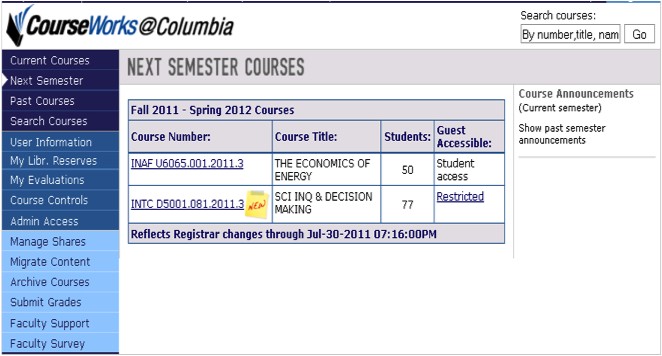
Did you know that you can navigate to ALL of your courses from the My Courses page at courseworks.columbia.edu, regardless of whether they’re on CourseWorks or New CourseWorks?

Log in to CourseWorks as usual. Any courses that are on New CourseWorks will be flagged with a yellow “new” sticker.

My Courses screen

Comments (0)
Categories : Tips

About This Site

On this site you will find news about CourseWorks along with tips about using its features to best advantage.

Links

Log in to CourseWorks
Contact the CourseWorks team

Recent News

  • Welcome Back for Spring 2015!
  • Oct. 25th Upgrade
  • Welcome Back: Fall 2014
  • March 15th Update 8AM – 2PM
  • System Maintenance Schedule

Topics

Maintenance MS Word transition Upgrade

Archives

Contact New Courseworks
Columbia University Information Technology | 615 West 131st St, Floor 5, New York NY 10027 | 212-854-1919 | [email protected]